Blogger in Draft announced some new capabilities in terms of the layout of your Blogger template. I played around with my own layout a bit this past weekend and liked what I saw.
I still think Blogger is one of the easiest ways to set up and run a blog. Occasionally, I get frustrated with some of the layout features, but overall, I like it. I use it. I recommend it people who want to get started blogging.
Only problem I had with Template Designer was it kept crashing in Firefox. I switched over to Chrome and it seemed to run just fine.
Tidbits I think might be interesting to technology teachers and the tech curious.
Showing posts with label google. Show all posts
Monday, March 15, 2010
Wednesday, February 17, 2010
Most Recent Image
I usually use Google Image search when I am in a hurry to find a picture. This post over at digital inspiration, The Problem with Google Image Search, basically says that Google isn't the best at bringing you the most recent photos out there. Pictures of "Real Time Events". He compared Google, Bing and Yahoo and Yahoo won in terms of bringing the most recent pictures.
I tried a couple of different searches on breaking news stories and got similar results. Interesting. I don't often need the most recent picture on the web, but this might be handy to know on those times I do.
[Image: "Binoculars"; Uploaded on February 14, 2010 by tunnelarmr; http://www.flickr.com/photos/tunnelarmr/4356244277/ (CC: Attribution-Noncommercial-Share Alike 2.0 Generic)
I tried a couple of different searches on breaking news stories and got similar results. Interesting. I don't often need the most recent picture on the web, but this might be handy to know on those times I do.
[Image: "Binoculars"; Uploaded on February 14, 2010 by tunnelarmr; http://www.flickr.com/photos/tunnelarmr/4356244277/ (CC: Attribution-Noncommercial-Share Alike 2.0 Generic)
)
Monday, February 8, 2010
Make Great Minds
Great website sponsored by Make called Elements of Humanity. They went out and interviewed prominent people in science and technology about what they find interesting. The resulting videos are fascinating.The one embedded is an interview with Rebecca Moore who manages the Google Outreach Program.
[Image captured from Elements of Humanity: http://blog.makezine.com/archive/2009/10/quick_and_easy_pumpkin_cutter.html]
Monday, October 19, 2009
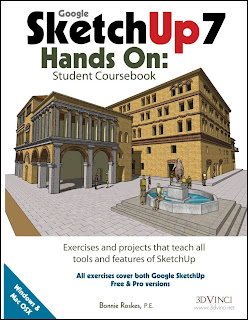
SketchUp 7: Hands On
I teach a short unit on SketchUp in my freshman Multimedia class. It's a survey course so we don't spend a lot of time on any one program but I always try to work a unit on SketchUp into the mix. I've struggled a bit in the past as to what I should teach the kids about SketchUp. I love the program. I love that it's free and the kids can download it at home if they want. But, those first few steps into three dimensional drawing can be daunting for my kids. I feel that my inexperience and lack of background is part of the reason I can't get most of the class excited about the program.Last year I decided I needed to improve my SketchUp skills in order to better teach it. Searched for all the books available and many of the websites. Stumbled on a review of SketchUp7: Hands On by Bonnie Roskes and tracked down the website where it's sold, 3DVinci. It's an expensive book but I convinced my department chair to buy a copy for me and spent part of my summer working through some of the exercises. I have to say, my SketchUp skills are better and I now have a better idea what to include in my lessons. I originally thought it might be a book we could buy for the kids to use but it is pretty comprehensive and weighs in at 502 pages. It would be overkill for a three week unit. I could see using this with high school class dedicated to the program. The publisher says it could be used with "advanced middle school" students but I think it's a little too advanced. Not that they couldn't do it, I've seen middle schoolers use SketchUp before and do some amazing things.
Still, this is a great resource for any middle school and high school teacher who uses SketchUp to have on their bookshelf. It also would be a useful book to have in the high school library and I'lll be making this suggestion to our librarian. The author, Bonnie Roskes has a blog that I just discovered today. Looking around her site I found this useful little explanation on how to better use the Push/Pull tool. The 3dVinci website also has a subscription service that will give you a 3 new lessons every month. (I've not tried this but looks promising.) There are some other resources availabe at the site. The website and the book are both worth looking at.
[Image captured from 3Dvinci: http://www.3dvinci.net/]
Tuesday, September 29, 2009
Using Google Docs in the Classroom
I've been exploring Tom Barrett's web site and came across this presentation on using Google Docs. Wish I had seen just the first two slides before I attempeted to teach a collaborative document to the kids. In case you don't know there are limits on the number of individuals that can collaborate at the same time. I believe it is around 10 for a doc. Barrett points out it is 50 for a spreadsheet. So, an entire class can practice working on the same document at the same time.Once again lots of good ideas. You should be able to find at least one you could use in your classroom.
[image captured from "twenty one interesting ways to use Google Docs in the Classroom"; http://docs.google.com/present/view?skipauth=true&id=dhn2vcv5_8323t58h3ft]
Thursday, September 24, 2009
Search Engines in the classroom
Was preparing for a short demo on Google for my multimedia kids the other day and thought I would look around for some new ideas and content. Clicked over to Larry Ferlazzo's excellent site and found a link to Twenty-three interesting ways to Use Search Engines in the Classroom put together by Tom Barrett.One idea I'm going to try soon is kind of the reverse of a scavenger hunt. Rather than give the kids a topic and have them create a search to find the item or subject, reverse that and give them a picture of what they are going to find. They have to figure out the search criteria. Sounds like a fun challenge.
Check it out....you're bound to find one thing you can use!
[via Larry Ferlazzo’s Websites of the Day…]
Thursday, August 27, 2009
My Friend: Music Video Created using SketchUp
Here is a creative use of Google SketchUp. The author made most of the visuals for a music video using the software. Watch the video and then check out the interview with Dave Righton on how he created this video for $12. He initially was using the program to storyboard out a project when he came up with the idea of using it as the basis for his music video.[Image captured from the music video for "My Friend Ship"]
Monday, June 22, 2009
Hey What's That?

Found this one via an application on my iPhone called Where. One of the functions on this little app is something called Hey What's That? Based on your location it will create a panorama showing the names of all the peaks you can see from that point. If you don't have a classroom set of iPhones to use, it has a more full featured version online.
I live with the Rocky Mountains to the west. So, if I was curious about that peak I've looked at every morning for the past ten years as I drove to work, I could enter the appropriate info into this program and it will give me a panoramic view that looks like this:

I can click on each of those little triangles and see the name of the peak and it's elevation. I also get a google map that shows the peaks in relation to where I am.

If I click on one of the little triangles on the google map, it will plot a line between that peak and my location along with the degrees from my location (based on a 360 degree panorama).

I am already planning a lesson using this program and pictures of the front range that we can take with our digital cameras from the front parking lot of our high school. Still working on the final product and objectives.
[Images all captured from website http://www.heywhatsthat.com/]
Monday, June 8, 2009
Google Wave

Marvelous new development from Google. Think of a "wave" as a conversation Participants can enter this conversation and leave it at any time. The software helps you, as a participant, to keep track of the conversation, participate in a meaningful way, and invite others into the discussion.
The way the app handles an online conversation is so much more intuitive than anything I use now. Looks like it would be easy to follow the various twists and turns of real conversation. I'm excited to try this out when it comes available later this year.
It's still in development but watch the demo to get some examples. I think it has the potential to change the way we work together online.
[Image: captured from the video: Google Wave Developer Preview]
Monday, April 27, 2009
Swine Flu Map
Here is a helpful Google map [Update: 5/3/09: This map has been moved here]you can use if your class is following the spread of the swine flu. It differentiates between suspected and confirmed cases. It also shows casualties.I've been checking the map periodically over the past few days and it's interesting to see how it is spreading. Scary when you realize each of the markers is a real person who is sick and that some of them denote deaths.
Right now it looks like the majority of cases outside of Mexico have been spread via air travel. I am sure you could locate major airports near each outbreak. Have your students predict how it can spread from there and then follow that up with a discussion on what precautions we all should be taking. Visit the CDC site to gather accurate information.
Larry Ferlazzo has a list of resources you can use in the classroom at his excellent site, Larry Ferlazzo's Websites of the Day. I suspect the kids (and us) are going to hear a lot rumours over the next few days as the seriousness of the situation is determined. Help yourself and your kids stay informed with good information.
[Image captured from http://maps.google.com/maps/ms?ie=UTF8&hl=en&t=p&msa=0&msid=106484775090296685271.0004681a37b713f6b5950&ll=32.639375,-110.390625&spn=15.738151,25.488281&z=5]
Monday, April 13, 2009
Google 411

I was watching David Pogue's TED talk recently and was reminded of a service I use frequently but have never mentioned here. Google-411. A free service that works like a regular information.
- Call 1-800-GOOG-411 (1-800-466-44110).
- State what you are looking for: donuts
- State the city and state
You're given several choices and then the option to connect. It hasn't let me down yet.
It's great unless you are like me and often forget within seconds the address given on one of these calls. Pouge came to my rescue and also shared another trick. Google SMS.
- Text Google (46645)
- In the body of your text state something like Donuts 80241.
- Send your text
Oh so handy!!
[Image captured from Google SMS website: http://www.google.com/mobile/default/sms.html#utm_campaign=en&utm_source=hussss&utm_medium=ha&utm_term=google%20sms&dc=gh0sss]
Wednesday, March 18, 2009
Embedding Spreadsheets in your website

The Google Docs Blog recently had a post about embedding spreadsheets in your website and include instructions on how to do the following:
- Schedule
- Calendar
- Reading List
- Countdown Timer
- Quote of the Day
There is also a link to instructions on ideas for twenty more embeddable spreadsheets.
[Image captured from http://www.vertex42.com/News/embedding-google-spreadsheets.html#ideas]
Monday, January 5, 2009
Embedding a Google Presentation
My beginning web students had a challenge before the end of the semester to build a new web site for our FBLA chapter. I graded them using a rubric for design and structure but the final site was picked by the FBLA sponsor and officers. It was a good life experience. If you don't listen to what your client wants and needs, you ain't going to get the job.I wanted to post the front pages of their work and thought I'd experiment with Google Docs again. I put a image of each web page on a single slide of Presentations and then published the doc. I then embedded it on my class website. I also embedded it below. This was a simple process and I had no glitches or problems in setting it up. I think I will probably be using this more in the future as a way to easily display student work.
[Image: "bike,submerged": Flickr: Uploaded on June 18, 2006 by cactusmelba: http://www.flickr.com/photos/cactusmelba/169623777/]
Tuesday, December 2, 2008
Google Docs Goofs! Techer goofs that is...
Here are two minor issues I've run into using Google Docs in my classroom. Not big things, but minor headaches none-the-less. I had my Multimedia students create a Google Site. It was the first time I taught this in class and my students did great. My two snags occured as I started to grade the projects.First, I had one class make me a collaborator. I figured I could just go to my account and then open each Site at my leisure. This worked fine. What I didn't anticipate was the volume of Sites in my account with no way to organize them into folders. So, I've now got 30 plus sites filling up the Sites section of my Google account. Not a big problem, just a bother. I wised up for my next class and had each of them email me the link to their site. This was much more manageable. I'm also now wondering if I need to have all my kids un-share me to get those sites out of my list?
[Image: Mashup of a screenshot from my Google Site and some eyes with a good dash of Photoshop. No restrictions on this. Use it if you want with my blessing.]
Google tracks the flu
The Official Google Blog had an interesting piece about tracking the number of flu cases based on the number of of related searches done through Google. They've found that they can predict where flu outbreaks will occur. As they state:"The CDC does a great job of surveying real doctors and patients to accurately track the flu, so why bother with estimates from aggregated search queries? It turns out that traditional flu surveillance systems take 1-2 weeks to collect and release surveillance data, but Google search queries can be automatically counted very quickly. By making our flu estimates available each day, Google Flu Trends may provide an early-warning system for outbreaks of influenza."
This is kind of cool and thought provoking. What else can we predict about our society based on search trends?
[Image: Captured from Google Flu Trends: http://www.google.org/flutrends/]
Wednesday, November 26, 2008
Google Forms
By far the most popular part of the Google Docs with the folks I work with is Forms. They have started popping up in all sorts of ways ever since we demonstrated this at a recent staff inservice. Including a mock election on Nov 4th to coincide with the national elections. Our Social Studies teachers copied the entire Colorado Ballot into a Forms doc and then brought all the kids down to a computer lab that day to vote. The votes were tallied instantly. Everyone involved thought it was extremely cool.Saw on The Offical Google Docs Blog that they had included some new Form templates including this Website Feedback Survey I've embedded below. Go ahead and take the survey and I'll post the results so you can see how the information is tallied in a spreadsheet. I'll also take a few snapshots of some of the analytic tools so you can see the different ways you can look at your data.
If you haven't tried Forms yet, I highly recommend it.
=====================================
Previous Post on this Topic: Quick Forms using Google Docs
[Image captured from the Official Google Docs Blog: http://googledocs.blogspot.com/2008/11/new-forms-added-to-templates-gallery.html]
Monday, November 24, 2008
Using Google Docs in the Classroom

I've been using Google Docs in my classroom for a couple of months now and am still exploring how to best utilize it's capabilities. Saw this posting today and found several ideas I plan on trying including setting up a shared presentation like this one.
[via Google Docs Blog]
[Image captured from Google Docs Blog: http://googledocs.blogspot.com]
Thursday, November 13, 2008
Google Alerts
Reading Larry Ferlazzo's website earlier this month, he mentioned Google Alerts and the ability to have them now appear in your RSS feed. I was aware of this feature but had never tried it.I signed into my Google account and headed over to the Google Products page, by going to the more link and then to the even more>> button from the drop down list. I chose Alerts and was able to set up a RSS feed in just minutes. The feeds showed up in my Google Reader immediately and I could manipulate them the same way I do any feed.
Cool! Now, I have links fed to my Reader regarding items I'm following or search for regularly.
[via Larry Ferlazzo's Websites of the Day...]
Sunday, October 26, 2008
The Google Gamut
Just finished watching "The Google Gamut: Everything you need to get Started" by Darren Kuropatwa at the K12 Online Conference 2008. I'm doing a presentation next week on Google Docs for our faculty and I was looking for some ideas. Darren does a good job of helping a beginner get started and some of the options available to them. There wasn't anything here that I hadn't heard before but it wasn't designed for someone like me. His target audience are those users new to the possibilities beyond Google's search page.Check out his presentation below or head over to the K12 Online Coference 2008 site and pick another presentation.
[Image: Captured from K12 Online Conference site: http://k12onlineconference.org/?page_id=147]
Tuesday, October 14, 2008
Google Blog Search
I teach full time.I try to write something every day.
I have two dogs that require daily attention.
My body complains if I don't eat, bathe and sleep once in a while.
I have two cats that spend hours every day ignoring me except when they are hungry.
I have a house with a yard that always have at least one or two nagging chores that need to be completed routinely.
I have friends who think that friendship requires more commitment than a yearly Christmas email even if it does include a cute animated Santa gif.
I have a wife who thinks conversation and companionship should be part of the marriage along with taking out the garbage. She swears that all three were clearly stated in our marriage vows.
I say these things just to drive the point home that I don't really have time to add much to my busy schedule. I should have ignored my curiosity about Google's Blog Search. I already have a RSS Reader that over flows daily with unread posts. Why would I want to add to my guilt over not knowing something about everything that is going on everywhere?
.....cause I can?
[Image: Flickr: "Juggling at night": Uploaded on June 23, 2006 by Mance: http://www.flickr.com/photos/mance/173141818/:http://www.flickr.com/photos/mance/173141818/]
Subscribe to:
Posts (Atom)

